

Why Is My eSIM Not Activating? 9 Common Causes Explained
Landing in a new country only to discover your eSIM is not activating can be incredibly frustrating. Many travelers expect instant internet access after scanning the QR code, but sometimes the eSIM gets stuck on “Activating,” shows “No Service,” or simply refuses to connect.
The good news is that most eSIM activation problems are surprisingly common and usually easy to fix. In many cases, the issue is related to phone settings, carrier restrictions, roaming configuration, or installation timing rather than the eSIM itself.
If your eSIM is not working properly, here are the most common reasons travelers run into activation issues and what you can do to solve them quickly.
1. Your Phone Is Carrier Locked
One of the most common reasons why an eSIM is not activating is carrier locking.
Some phones purchased through mobile contracts are locked to a specific carrier. Even if the phone technically supports eSIM, international travel eSIMs may not work until the device is fully unlocked.
This is especially common with:
- US carrier phones
- contract-based devices
- older Android models
- certain refurbished phones
Typical symptoms include:
- eSIM installs successfully but no signal appears
- “Unsupported SIM” notifications
- endless “Activating” status
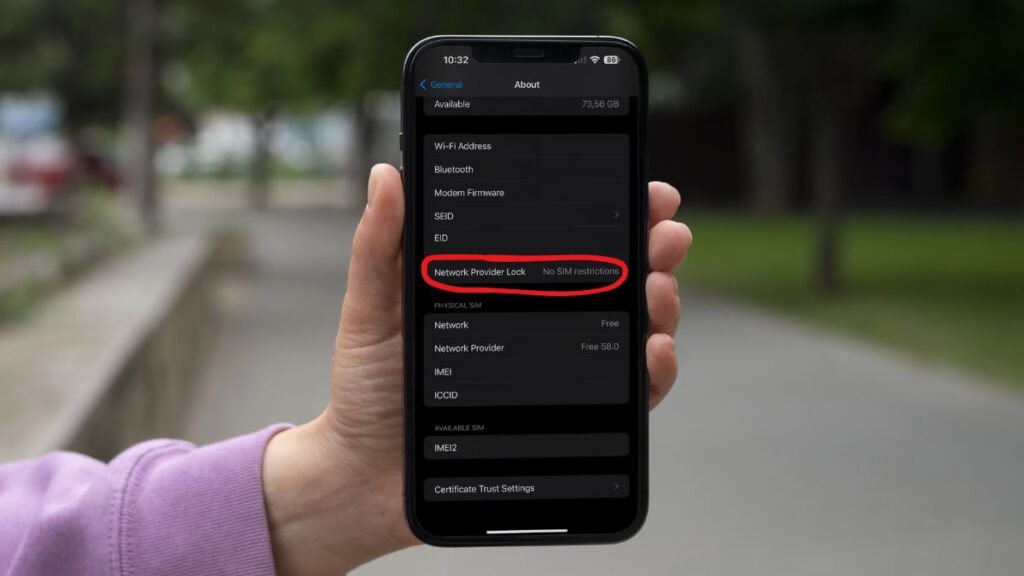
On iPhone, you can check this by going to:
Settings → General → About → Carrier Lock
![Learn How to Check If iPhone is Carrier Locked[2026 Updated]](https://images.wondershare.com/drfone/article/2024/02/how-to-check-if-iphone-is-carrier-locked-01.png)
If it says “No SIM Restrictions,” your device is unlocked.
You can also read this related guide about whether eSIM works on locked phones.
2. The eSIM Was Activated Too Early
Many travelers misunderstand the difference between installing an eSIM and activating it.
Some providers only start the validity period after the eSIM connects in the destination country. Others activate immediately after installation.
For example:
- you install the eSIM three days before departure
- the plan activates instantly
- part of your data validity expires before the trip even starts
This confusion happens frequently with short-term plans like 5-day or 7-day packages.
If you are unsure about timing, this guide on whether you should activate eSIM before arrival explains how activation policies work.
3. Your Phone Does Not Actually Support eSIM
 Not every phone with dual SIM functionality supports eSIM.
Some regional models also have limited compatibility.
| Phone Type | Possible Limitation |
|---|---|
| China-market iPhone | No eSIM support |
| Carrier-specific Android | eSIM disabled |
| Budget Android models | Partial compatibility only |
Before buying an eSIM, always verify:
- exact phone model
- regional compatibility
- eSIM availability in settings
You can usually find the eSIM section under:
Settings → Cellular / Mobile Network → SIM Manager
4. The QR Code Installation Failed
QR code installation problems are extremely common during travel.
This often happens at airports where WiFi connections are unstable or crowded.
Common causes include:
- poor internet connection
- blurry QR screenshots
- VPN interference
- installation interruption
- scanning the same QR code multiple times
Some eSIM providers only allow one successful installation attempt.
- Use stable WiFi
- Increase screen brightness
- Disable VPN temporarily
- Restart the device before reinstalling
5. Mobile Data Is Assigned to the Wrong SIM
This issue happens very often on dual SIM phones.
The eSIM may already be installed correctly, but your phone is still using the physical SIM for mobile data.
As a result:
- the eSIM appears inactive
- internet does not work
- unexpected roaming charges may occur
On iPhone:
Settings → Cellular → Cellular Data → Select Your eSIM
On Android:
Settings → SIM Manager → Mobile Data → Choose eSIM
This small setting causes many travelers to think the eSIM failed even though it is already active.
6. Data Roaming Is Disabled
Many travel eSIMs rely on roaming agreements with local partner networks.
Because of this, roaming often needs to stay enabled for the eSIM profile.
A lot of users mistakenly disable roaming because they want to avoid roaming charges.
However, for international travel eSIMs, roaming is usually required.
If roaming is OFF:
- signal bars may still appear
- internet may not work at all
Turn ON Data Roaming for the travel eSIM profile.
You can also compare how travel eSIM differs from traditional roaming in this guide about eSIM vs roaming for international travel.
7. APN Settings Are Missing or Incorrect
Some eSIM providers automatically configure APN settings. Others require manual setup.
Without the correct APN:
- internet may not connect
- apps may fail to load
- connection may feel unstable
| Provider Type | Typical APN Setup |
|---|---|
| Travel eSIM | Automatic |
| Regional carriers | Manual APN sometimes required |
| Global eSIM providers | Dynamic roaming APN |
Most providers include APN instructions inside the activation email.
8. VPN or Security Apps Are Interfering
VPN apps can sometimes block activation servers or interfere with network registration.
This is especially common in:
- China
- UAE
- corporate-managed work phones
- devices with security restrictions
If activation fails repeatedly:
- disable VPN temporarily
- restart the device
- retry installation using stable WiFi
Travelers visiting restricted-network countries may also find this guide useful: Best eSIM Data Plans for China Travel.
9. Weak Coverage at Your Arrival Location
Sometimes the eSIM is already activated correctly — the signal is simply weak where you landed.
This happens more often than many travelers realize.
Common situations include:
- underground train stations
- airport immigration areas
- mountain regions
- remote islands
- rural highways
For example:
- subway stations in Tokyo may have weaker reception underground
- Bali mountain areas can have inconsistent coverage
- European train routes sometimes switch networks constantly
If your eSIM does not connect immediately:
- wait a few minutes
- toggle airplane mode
- restart your phone
- move outdoors temporarily
Quick Troubleshooting Checklist
- Restart your phone
- Enable Data Roaming
- Select the eSIM for mobile data
- Check APN settings
- Disable VPN temporarily
- Verify your phone is unlocked
- Reconnect manually to another network
- Toggle airplane mode
Most Common eSIM Activation Problems
| Problem | Likely Cause |
|---|---|
| eSIM installed but no internet | Data roaming OFF |
| QR code fails | Installation error |
| No signal after arrival | Wrong network selection |
| eSIM stuck on activating | Carrier lock |
| Slow internet abroad | Weak local coverage |
| Works only on WiFi | APN issue |
If you continue having issues abroad, this troubleshooting guide on fixing eSIM problems while traveling covers additional solutions.
Most eSIM activation failures are not permanent problems. In fact, simple settings like enabling roaming, selecting the correct SIM for data, or restarting the phone solve the majority of issues travelers experience.
Understanding how travel eSIMs work before your trip can save time, reduce stress, and help you stay connected immediately after arrival.
FAQs
1. Why is my eSIM stuck on activating?
This usually happens because of carrier locks, weak internet during installation, or incorrect roaming settings.
2. Why does my eSIM show signal but no internet?
In most cases, Data Roaming is disabled or APN settings are missing.
3. Can I reinstall an eSIM after deleting it?
Some providers allow reinstallation, while others only allow one QR code activation. Always check provider policies first.
4. Does restarting the phone help fix eSIM issues?
Yes. Restarting often refreshes network registration and reconnects the device to local carriers.
5. Can I use eSIM and physical SIM together?
Yes. Most modern smartphones support dual SIM usage with one physical SIM and one eSIM simultaneously.
6. Is it better to install eSIM before departure?
Usually yes, but travelers should first understand when the activation period officially begins.